

Opening an online store requires not only the display of products and selection of themes. Something else that needs to be considered includes design, navigation, and identical experience. The latest innovation to have emerged from Shopify includes the introduction of a product known as Shopify Canvas, which is basically an AI-powered designer for opening an online store.
The Canvas merges the visual editor along with the AI Assistant of Shopify, named Sidekick. One can describe his requirements and preview the changes made to his shop. This technology provides the opportunity to have an online store for those businessmen who do not have knowledge about technology. However, on the other hand, this can be a wonderful opportunity for your shopify store. Connect with Jaipuria Geeks to get your shopify store fixed for making more profit.
What Is Shopify Canvas?
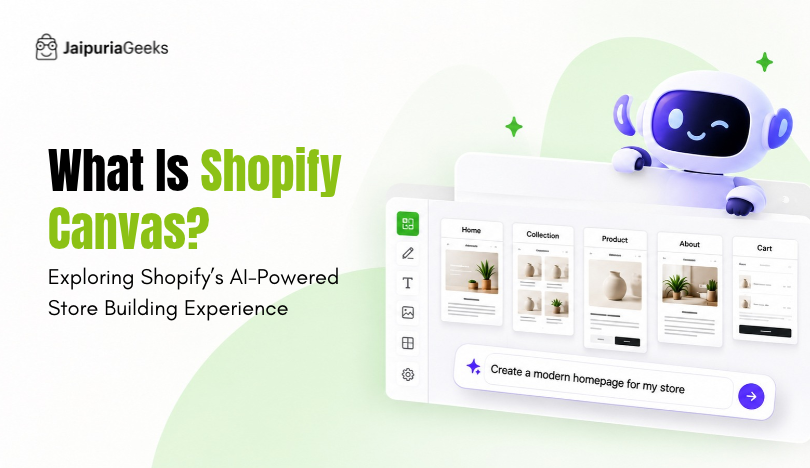
Shopify Canvas is a platform that allows the store owners using Shopify to design and alter the themes of their websites in a visual manner. Canvas is another solution. It allows store owners to view the design of the complete website as a whole. They can move from one page to another, zoom into specific sections, and change them.
In addition, the canvas is associated with the Shopify Sidekick, which is the AI assistant from Shopify. Users can articulate their needs using plain language, and the Sidekick will interpret the command and implement the changes to the current theme on the website.
How Does Shopify Canvas Work?
Here’s how merchants could use this experience:
1. Launch Canvas from Shopify Admin
Merchants could access Canvas by using Themes from Shopify admin. They could either create a new theme or make use of a compatible theme copy. This offers them a space where they can experiment with their store design without having to replace their current storefront.
2. View the Entire Store in One Workspace
Various store template options are displayed on the interactive workspace through Canvas. Such store templates include homepage, product page, collection page and other supported templates. Users can pan through the entire workspace so that they have a clear idea about the entire store layout.
They can zoom in on specific sections of the store to edit them easily. It becomes easy to notice design differences between various templates.
3. Give Instructions to Shopify Sidekick
Using Sidekick, the merchant will be able to express his ideas about the site design using a chat application. It is unnecessary for users to know how to use complex coding languages. They can simply explain what changes they would like to see.
4. Change Elements Visually
Canvas is not solely based on AI commands. Users can also change selected elements visually. Users have an option to change supported blocks, settings, and text by visual means. Thus, the user gains more influence on the final result.
5. Review the Store
The Canvas allows seeing the actual functioning theme instead of the static design model. Users can view animations, interactions, and various sizes of screens. Users may also look at the store pages using different products and collections. This will help in identifying the problems in the design before launching the theme.
Features of Shopify Canvas
Canvas offers some features that will help users to be flexible with their store designs. Some of the most helpful features of Canvas are as follows.
1. AI-driven Customization of Store
Canvas leverages Sidekick from Shopify to understand design requests and change themes. Users do not have to code as the AI tool will help them to achieve what they want. It works not only for single sections but also for complete store redesigning. It will help companies to experiment with different ideas of designs.
2. View the Complete Store
One of the major strengths of Canvas is that it shows the complete view of the store. It shows multiple templates at once instead of showing them separately.
3. Real-Time Design Updates
Modifications done by using Sidekick reflect on the Canvas workspace itself. This enables the merchant to see the changes in design in real time. This eliminates the need for frequent previewing.
4. Interactive Store Previews
A live example of the theme being modified is shown via the Canvas workspace. This allows the user to test out interactions and animations on various screen sizes. This enables the merchant to get an idea about the store’s functionality before it is made available to the customers.
5. AI-Assisted Coding
Sidekick is able to collaborate with the theme’s files and code directly. The software can coordinate modifications in different templates and sections of the theme. It also checks the code and goes through the screenshots of its work. This process enables the assistant to detect errors and refine its results.
6. Design Collaboration Experience
Canvas enables merchants and Sidekick to work on the same design interface. The user is able to give comments while the AI is making alterations. Sidekick is also able to remember previous design preferences during the interaction.
Benefits of Shopify Canvas for Ecommerce Businesses
There are various benefits that could come from using Shopify Canvas for online stores.
1. Reduced Dependence on Technical Knowledge
In the case of traditional theme customization, some coding skills are often needed. In order to perform certain modifications of the theme, developers may be necessary.
Through Canvas, there are fewer challenges associated with coding as most actions can be performed via natural-language commands. This will allow merchants to contribute more to store development.
2. Increased Speed of Store Customization
The process of editing different templates could take much time. Through Canvas, merchants can make coordinated modifications within one visual interface.
Using Sidekick, various themes could be modified by following certain commands.
3. Better Design Consistency
A merchant needs to maintain a uniform look through all the pages. Uncoordinated page layouts will affect the professionalism of the brand. Using Canvas, merchants can analyze the various templates at once. They can point out the inconsistencies in the templates and maintain consistency.
4. Easy Experimentation in Design
It is usually necessary for the business to experiment with different layouts. With the help of Canvas, merchants can have another opportunity to do so. Merchants can request a variety of designs and evaluate them.
5. More Control Over the Shopping Experience
Designing the shop should favor the requirements of the customers as well as those of the business. This tool will allow the merchants to evaluate the entire storefront while designing. This way, they can concentrate on such factors as product display, navigation, promotions, and page design. They may improve the shopping experience.
Nevertheless, it does not mean that improved design is going to result in higher conversion rates.
Limitations of Shopify Canvas
While Canvas offers some valuable features, however, businesses need to know about its limitations.According to Shopify, Canvas is still an early-access feature at this moment in time. It can be accessed by only selected stores.
The main limitations are as follows:
- Limited availability: Not all Shopify stores have access to Canvas.
- Desktop access: Canvas is available only on desktop right now.
- Third-party themes: Third-party themes from Shopify Theme Store are not supported at launch.
- App integrations: App blocks and app embeds are not supported right now.
- Shopify Markets: Markets is not available right now.
- Translations: Canvas does not support translations at the moment.
- Theme updates: Canvas themes do not get regular theme updates.
This limitation can be relevant for stores that have more complex customization needs.
How Can Shopify Developers and Agencies Use Canvas?
The Shopify Canvas has offered additional opportunities to developers and development agencies as well. They could be used to experiment with design ideas and develop a structure of the theme. Then, the developer would analyze the code and make changes if needed. Also, an agency could benefit from Canvas to figure out the needs of the client. A visual representation helps to discuss preferences in the matter of design with the owner of the business.
However, the design produced by AI needs professional analysis. A developer needs to test responsiveness, performance, accessibility, and functionality of it. Sometimes the integration process requires custom development. That is why professional development services could be beneficial for certain businesses.
Is Shopify Canvas the Future of Store Building?
Shopify Canvas can be regarded as a new stage in the evolution of ecommerce design that uses artificial intelligence technology. Developers will be able to use visual and conversational interface to customize online stores without being bogged down by settings.
Nevertheless, there are certain aspects of store development where AI is not enough. In order to create high-quality software solutions, developers must be well-versed in technologies. Thus, the optimal solution will be to combine artificial intelligence tools with skilled developers.
Build a Better Shopify Store with Jaipuria Geeks
An effective Shopify website requires much more than a good homepage. It should have proper designing, easy navigation, functional elements, and customer-oriented purchasing experience. The Shopify Canvas makes the designing process of the store simple, yet professional consultation is required. A business needs the appropriate development strategy to make its designs functional.
We offers services for designing and improving the Shopify stores. We are focused on creating a good ecommerce experience that will facilitate your business. If you want to set up a new Shopify store or improve your existing store, we are ready to help you. Contact us at Jaipuria Geeks for the best Shopify development services for your business.